Zero-Downtime Kubernetes Deploys: Probes & preStop
By Muhammad Soliman
TL;DR. A Kubernetes rolling update can drop requests for three separate reasons, and each one has its own setting. A new pod can receive traffic before the app can serve it, so gate it with a readiness probe that checks real dependencies. An old pod can receive SIGTERM while other components are still routing traffic to it, so keep it serving for a few seconds with a preStop sleep. Requests already inside the pod die when the process exits, so drain on SIGTERM and give the pod a terminationGracePeriodSeconds that covers the sleep plus your longest request. Add maxUnavailable: 0 and a PodDisruptionBudget, and a deploy stops producing 502s.
- New pods: readiness probe that proves the app can serve. Startup probe for slow boots.
- Old pods:
preStopsleep, so endpoint removal finishes before the app starts shutting down. - In-flight requests: a
SIGTERMhandler that drains, and a grace period longer than the drain. - Rollout pace:
maxUnavailable: 0,maxSurge: 1or more. - Voluntary evictions: a PodDisruptionBudget, so node drains cannot take out every replica.
What Kubernetes guarantees, and what it does not
A Deployment will replace pods one at a time, and it will not remove an old pod until the new one reports ready. Those two facts are what most teams rely on. They are not the whole story. "Ready" is only as accurate as the probe that reports it. And the removal of an old pod is a sequence of separate actions, several of them asynchronous, that the platform does not coordinate for you.
If the defaults were enough, a rolling update would never produce errors. In practice, most services see a short burst of 502 or connection reset errors on each deploy. The burst is small, it lasts a few seconds, and it is easy to miss on a dashboard that averages over a minute. It is not small for the user who was submitting a form at that moment.
Getting to zero means understanding three moments: when a new pod starts taking traffic, when an old pod stops taking traffic, and what happens to requests already inside the old pod. Kubernetes gives you a setting for each one. The defaults get at least one of them wrong for most web services.
Readiness decides when a new pod gets traffic
A readiness probe answers one question: should this pod receive traffic right now? A liveness probe answers a different one: should the kubelet restart this container? Mixing them up is the most common cause of deploy-time errors.
With no readiness probe, Kubernetes treats a container as ready once its process starts. The Service then sends requests to a process that may not have opened its database connection, loaded its config, or warmed its cache. Those first requests fail, and nothing in the rollout stops to look at them.
The fix is a readiness endpoint that checks what a request actually needs: the database is reachable, migrations have run, the downstream clients are built. According to the Kubernetes probe documentation, a failed readiness probe removes the pod's IP from the EndpointSlices of every matching Service. That is the mechanism that keeps traffic away from a pod that is not ready, and it works only if the probe is honest.
Two rules keep the probes useful:
- Keep the readiness check cheap and specific. A readiness endpoint that calls three external APIs will flap whenever one of them has a slow minute, and flapping pods shrink your capacity during the rollout.
- Use a startup probe for slow starters, and keep the liveness probe conservative. A startup probe disables the liveness and readiness checks until it succeeds, so a slow JVM or a model loader is not killed before it finishes booting. A liveness probe that fails during a slow dependency check restarts a healthy pod and makes the outage longer.
The termination sequence, step by step
The second moment is the old pod leaving. The following diagram shows the sequence for a pod deleted with a 40-second grace period and a 10-second preStop sleep.
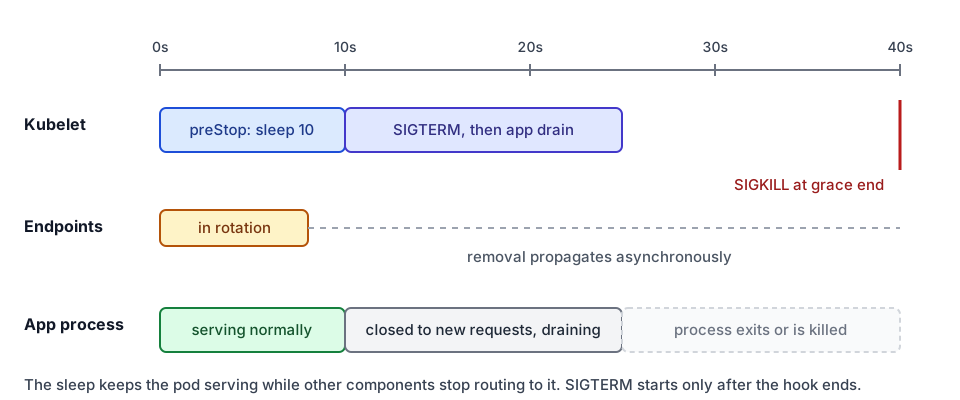 Pod termination with a preStop sleep: the pod keeps serving while other components stop routing to it
Per the Pod lifecycle documentation, the sequence works like this:
- The pod is marked as terminating in the API server, and its grace period starts counting down.
- The kubelet on the node begins the local shutdown. If a container has a
preStophook, the kubelet runs it first. - The control plane removes the terminating pod from the Service's endpoints. This happens through the EndpointSlice machinery, and it is asynchronous. kube-proxy and any load balancer in front of the cluster learn about it at their own pace.
- After the
preStophook finishes, the kubelet asks the container runtime to sendSIGTERMto the main process in each container. - If the process is still running when the grace period ends, it receives
SIGKILL.
Step 3 is the one that causes the trouble. Endpoint removal is not instantaneous, and it is not ordered with respect to the application. Without a preStop hook, the app begins shutting down on step 4 while some clients and proxies still hold the old endpoint. Connections that arrive after the app stops accepting them fail.
Why a preStop sleep is the fix
The fix is a short preStop hook that does nothing except wait. While the hook sleeps, the process is still running and still serving. Endpoint removal and the load balancer's view of the pod catch up during that window. When the sleep ends, the kubelet sends SIGTERM, and by then very few new requests are arriving.
The hook looks like this:
lifecycle:
  preStop:
    exec:
      command: ["sleep", "10"]
Three details matter here:
- The
sleepbinary has to exist in the image. A distroless image without a shell will fail the hook. Either ship a tiny sleep binary or use an HTTPpreStopcall to an endpoint your app exposes. - Ten seconds is a common starting point, not a magic number. Measure how long your ingress controller or load balancer takes to drop an endpoint, then add margin.
- The hook counts toward the grace period. The container lifecycle documentation states that the grace period countdown starts before the
preStophook runs. A hook that outlasts the grace period is cut short.
The sleep is a deliberate delay on a shutdown path, which looks odd in code review. It exists because Kubernetes does not order endpoint removal before the application receives SIGTERM. The sleep creates that order by hand.
Drain in-flight requests on SIGTERM
The third moment is the requests already being served when shutdown begins. A graceful handler does four things: stop accepting new connections, let in-flight requests finish, close idle keep-alive connections, and exit. Most HTTP frameworks have a call for this. The common mistake is that nothing is wired to SIGTERM, so the process dies on the signal and abandons every open request.
Two rules keep the drain honest:
- The app's own drain timeout must be shorter than the grace period. If the drain is still running when
SIGKILLarrives, the process dies mid-request anyway. Finishing on your own terms is always cleaner. - Long-running requests need a decision. Either they are short enough to finish inside the drain window, or the client has to retry them. Streaming responses and WebSocket connections are the usual exceptions, and they need an explicit close message to the client.
Grace period arithmetic
terminationGracePeriodSeconds is the total budget from the start of termination to the forced kill. The table below lists the settings that interact with it.
| Setting | What it bounds | Rule of thumb |
|---|---|---|
preStop sleep | Time the pod keeps serving before SIGTERM | 5 to 15 seconds, measured against your load balancer |
| App drain timeout | Time the process waits for in-flight requests | Longest normal request, plus a small margin |
terminationGracePeriodSeconds | Total time from termination start to SIGKILL | Sleep + drain + 5 to 10 seconds of slack |
readinessProbe.periodSeconds | How fast a new pod is added to endpoints | 2 to 5 seconds |
maxSurge / maxUnavailable | How many pods are replaced at once | maxUnavailable: 0, maxSurge: 1 for user-facing services |
The default grace period is 30 seconds. If your sleep is 10 seconds and your longest request takes 20 seconds, 30 seconds leaves no margin. Raise it.
Rollout pace: maxSurge and maxUnavailable
The Deployment strategy decides how many pods are replaced at once. Per the Deployment documentation, maxSurge is the number of pods allowed above the desired count during an update, and maxUnavailable is the number allowed to be missing. Both default to 25 percent when not set.
For a user-facing service, maxUnavailable: 0 with maxSurge: 1 keeps the capacity at or above the desired count throughout the rollout. The cluster briefly runs one extra pod per rollout step, which costs a little money and time. In exchange, a new pod has to pass its readiness probe before an old one is removed.
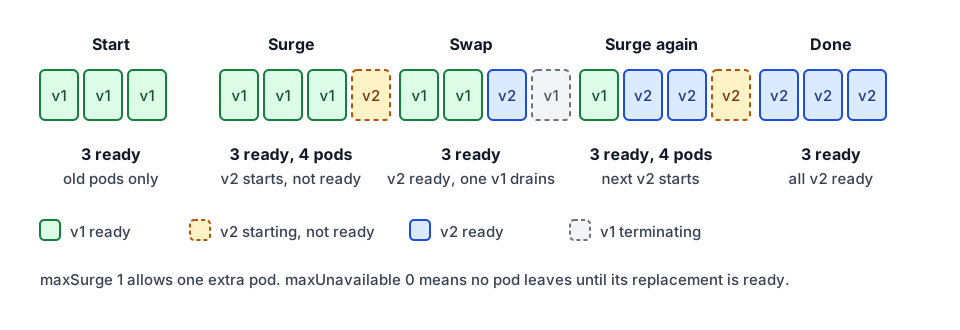 Rolling update with maxSurge 1 and maxUnavailable 0 on a three-replica service
The figure shows three replicas. The ready count never falls below three, because each old pod is removed only after its replacement is ready and the termination sequence above has run. Setting maxUnavailable to 1 speeds up the rollout and lowers the floor to two ready pods during each step. That is a reasonable trade for batch workers and a poor one for a checkout API.
Recreate is the other strategy. It terminates every old pod before it creates a new one. That causes a gap in service by design. It can be the honest choice for a workload that cannot run two versions at once, such as a single-writer process that holds a lock on shared state. Pick it on purpose, not by default.
Protect against voluntary evictions with a PodDisruptionBudget
Rolling updates are not the only thing that removes pods. A node drain for an upgrade, a cluster autoscaler scale-down, or a manual kubectl drain all evict pods voluntarily. The disruption documentation describes a PodDisruptionBudget (PDB) as a limit on how many replicas of an application can be down at once from voluntary disruptions. The PDB does not stop involuntary failures such as a node crash.
apiVersion: policy/v1
kind: PodDisruptionBudget
metadata:
  name: web
  namespace: prod
spec:
  maxUnavailable: 1
  selector:
    matchLabels:
      app: web
With three replicas and maxUnavailable: 1, a drain can evict one pod at a time and must wait for the replacement to become ready before it evicts the next. A PDB with minAvailable equal to the replica count blocks every drain, which stalls node upgrades. Use maxUnavailable: 1 for most services, and check it with kubectl get pdb before you drain a node.
The full manifest
The Deployment below combines the pieces. The application image is a placeholder, and the paths assume your app exposes health and readiness endpoints.
apiVersion: apps/v1
kind: Deployment
metadata:
  name: web
  namespace: prod
spec:
  replicas: 3
  selector:
    matchLabels:
      app: web
  strategy:
    type: RollingUpdate
    rollingUpdate:
      maxSurge: 1
      maxUnavailable: 0
  template:
    metadata:
      labels:
        app: web
    spec:
      terminationGracePeriodSeconds: 40
      containers:
        - name: web
          image: registry.example.com/web:1.8.2
          ports:
            - name: http
              containerPort: 8080
          startupProbe:
            httpGet:
              path: /healthz
              port: http
            periodSeconds: 2
            failureThreshold: 60
          readinessProbe:
            httpGet:
              path: /ready
              port: http
            periodSeconds: 3
            failureThreshold: 2
          livenessProbe:
            httpGet:
              path: /healthz
              port: http
            periodSeconds: 10
            failureThreshold: 3
          lifecycle:
            preStop:
              exec:
                command: ["sleep", "10"]
The grace period of 40 seconds covers a 10-second sleep and a drain of up to 25 seconds, with 5 seconds of slack. The startup probe allows up to 120 seconds for the app to boot, which is 60 checks at 2-second intervals.
Verify the rollout
Do not trust the manifest until you have watched a rollout. Two checks cover most of it. The first waits for the rollout to finish and reports failures:
kubectl -n prod rollout status deployment/web --timeout=5m
The second measures what users see. Run a client loop against the public URL for the whole rollout and count the status codes:
while true; do
  curl -s -o /dev/null -w '%{http_code}\n' https://web.example.com/
  sleep 0.2
done | sort | uniq -c
Stop the loop with Ctrl-C after the rollout completes. Any 502 or 503 in the count means one of the three moments is still wrong. Go back to the probe, the sleep or the drain, and fix the one that matches the failure time.
How SeaGit handles this
SeaGit deploys applications with a Helm chart, and the chart exposes the settings above. The application chart in this platform's repository (helm-charts/charts/application) and the app template that the cluster worker renders both include:
deploymentStrategy:
  type: RollingUpdate
  rollingUpdate:
    maxSurge: 1
    maxUnavailable: 0
  minReadySeconds: 0
  progressDeadlineSeconds: 300
startupProbe: {}
readinessProbe: {}
livenessProbe: {}
terminationGracePeriodSeconds: 30
shutdownDelaySeconds: 0
lifecycleHooks:
  enabled: false
  preStop: {}
podDisruptionBudget:
  maxUnavailable: 1
Some of this is documented for users and some is not, so here is what can be said with confidence:
- The applications documentation lists rolling update as the default deployment strategy, with max surge and max unavailable configurable. The other option listed is Recreate.
- Health checks are set through a health check path when you configure the container. The getting started guide shows the Health Check Path field, and the deployments documentation covers health check failures and how to tune them.
- When
shutdownDelaySecondsis greater than zero, the chart adds apreStopsleep of that length. ApreStopset throughlifecycleHookstakes precedence over it. - The PDB defaults to
maxUnavailable: 1in the platform's app template, and that template's values only enable it for multi-replica apps. The readiness probe and the grace period are chart values too. The docs pages checked for this post do not describe how each one is set from the console. If you need a value the console does not expose, ask support before you rely on it.
SeaGit does not change the rollout math for you. The chart gives you the knobs, and the values in this post still have to be measured against your application.
Frequently asked questions
Why do I get 502 errors during a Kubernetes rolling update?
The usual causes are a missing readiness probe, a process that receives SIGTERM while the endpoint is still in rotation, and requests that are cut off when the process exits. A preStop sleep, a SIGTERM drain handler and a readiness probe that checks real dependencies address all three.
How long should a preStop sleep be?
Measure it. Watch how long your ingress or load balancer takes to stop routing to a terminating pod, and add margin. Ten seconds is a common starting point. The sleep counts toward terminationGracePeriodSeconds, so the grace period must be longer than the sleep plus the drain.
Should I use maxUnavailable 0 or 1?
For user-facing services, use maxUnavailable: 0 with maxSurge: 1 or higher, so capacity never drops below the desired count. Use a higher maxUnavailable only when the workload can tolerate fewer ready replicas for a short time, such as batch workers.
Does a PodDisruptionBudget stop rolling updates from causing downtime?
No. A PDB limits voluntary disruptions such as node drains and autoscaler scale-downs. A rolling update is governed by the Deployment strategy and the readiness probes. You need both.
Sources
- Pod Lifecycle, Kubernetes documentation, checked October 2026
- Container Lifecycle Hooks, Kubernetes documentation, checked October 2026
- Configure Liveness, Readiness and Startup Probes, Kubernetes documentation, checked October 2026
- Deployments, Kubernetes documentation, checked October 2026
- Disruptions and PodDisruptionBudgets, Kubernetes documentation, checked October 2026