Kubernetes Preview Environments per Pull Request
By Muhammad Soliman
A preview environment is a short-lived copy of your application, built from one commit, running on real cluster infrastructure at its own URL. It exists so a change can be tested in the same network, DNS and certificate setup as production before it is merged or promoted. This guide covers how preview (ephemeral) environments work on Kubernetes, what they need from the platform underneath, and how SeaGit creates them for each commit.
TL;DR
- A preview is built from one commit SHA and deployed as its own Helm release with its own hostname. It does not share state with main.
- Previews need four things from the platform: image builds, an isolated release, DNS records, and TLS certificates. Missing any one of them makes the preview a mock.
- SeaGit creates preview slots on non-main deployments only. Main is updated only when you promote a tested slot or mark it as main.
- Each environment caps its preview slots with
max_deployments_per_instance, so cost and cluster load stay bounded.
Why a shared staging environment stops working
A single shared staging environment reflects one branch at a time. Two engineers testing two features overwrite each other. Manual hotfixes make staging drift from production. After a few merges, "it works on staging" tells you little about main.
Ephemeral environments avoid this by making each environment disposable and reproducible. Each one is built from a commit, so the same SHA always produces the same environment. Nothing lives long enough to drift, and parallel reviews do not need a booking system.
The property that matters most is isolation without losing fidelity. A preview that runs against a mock database, a reduced replica count and a different ingress is useful for unit-level checks only. A preview that runs in the same cluster, with the same add-ons, DNS zone and certificate issuer as production, can catch the problems that actually reach users: a missing secret, a wrong ingress class, a certificate that does not issue.
What a preview needs from the platform
Most teams that try preview environments by hand build the first two parts quickly and stall on the last two.
- An image build per commit. The build must be reproducible and tagged with the commit SHA, so the preview and the image it runs can be traced back to the source.
- An isolated release. Each preview needs its own Kubernetes objects and its own release name, so one preview cannot overwrite another.
- A DNS record per preview. Without this, the preview has no URL that a reviewer or a partner's integration can call. external-dns can create these records from Ingress or Service annotations.
- A certificate per preview. Without this, the preview only works over plain HTTP or with a browser warning. cert-manager can request one from an Ingress annotation that names a ClusterIssuer.
A reference Ingress for one preview looks like this. It is an illustrative example of the objects involved, not a manifest SeaGit generates verbatim:
apiVersion: networking.k8s.io/v1
kind: Ingress
metadata:
  name: web
  namespace: preview-pr-42
  annotations:
    cert-manager.io/cluster-issuer: letsencrypt-prod
    external-dns.kubernetes.io/hostname: pr-42.preview.example.com
spec:
  ingressClassName: nginx
  rules:
    - host: pr-42.preview.example.com
      http:
        paths:
          - path: /
            pathType: Prefix
            backend:
              service:
                name: web
                port:
                  number: 80
  tls:
    - hosts:
        - pr-42.preview.example.com
      secretName: pr-42-tls
The external-dns.kubernetes.io/hostname prefix is the default for ExternalDNS releases from v0.22.0. Older releases used external-dns.alpha.kubernetes.io/, so check the version your cluster runs before copying an annotation.
Each preview then needs a release. With Helm, a per-preview install is a single command. The flags below are from the helm upgrade reference:
helm upgrade --install pr-42 ./chart \
  --namespace preview-pr-42 \
  --create-namespace \
  --set image.tag=3f9c1ab \
  --set ingress.host=pr-42.preview.example.com
--install creates the release if it is missing and upgrades it otherwise, so re-running the command on a new push updates the same preview. --create-namespace creates the namespace on the first run.
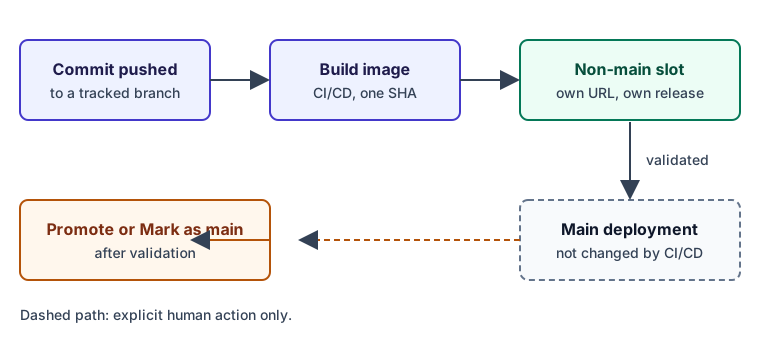 A commit reaches a non-main slot. Main changes only through promotion.
Keeping preview traffic away from production
The safety of a preview depends on the routing rule that decides where a build lands. If CI can overwrite the production release, previews become a liability. The rule to enforce is simple: automated builds target only non-main slots, and a person decides when a slot becomes main.
Three things make this rule hold in practice:
- Dedup by SHA. A new push to a commit that already has a slot re-triggers that slot instead of creating another one.
- Caps per environment. A limit on preview slots stops a busy repository from creating an unbounded number of releases.
- Explicit promotion. Moving a preview to main is a separate action, so a green build never reaches production by accident.
The diagram below shows the cap. A main slot is never counted against the preview limit, and a full environment asks you to free a slot before it creates another.
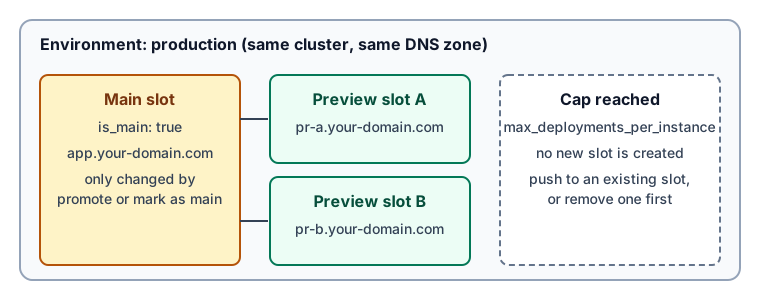 One environment, one main slot, and preview slots capped by max_deployments_per_instance.
Promotion: from a validated preview to production
A preview is half of the workflow. The other half is what happens after review. The common anti-pattern is a second, manual deploy path for production that shares no history with the preview. If production runs different steps from the preview, you tested one thing and shipped another.
There are two ways to close that gap, and they are different actions:
| Action | What it does | What stays the same |
|---|---|---|
| Promote | Copies the preview's configuration and triggers a fresh deploy into the main slot | The main slot's hostname and Helm release name |
| Mark as main | Moves the is_main flag to the chosen slot | The slot's existing release and URL, and CI/CD now targets the remaining non-main slots |
Promote is the right choice when the main slot should be rebuilt from the validated configuration. Mark as main is the right choice when the validated slot already runs the release you want to keep.
How SeaGit handles this
SeaGit creates preview environments as ephemeral deployments inside the same environment as your main deployment. Each one is a separate Helm release with its own DNS subdomain. The behaviour below is taken from the product documentation and from the platform code.
- Push to a tracked branch. For Git-sourced applications, SeaGit monitors the branch and starts a build when a push arrives. The deployments documentation describes this flow and the deployment record that links back to the commit.
- Pick a non-main slot. CI/CD never writes to the main deployment. It reuses the slot for a SHA that already has one, or creates a new ephemeral slot while the environment is below its limit. The limit is the
max_deployments_per_instancesetting on the environment. - Read the URL and status. Each slot gets its own URL on your domain. The CI/CD routes page lists the status and summary that SeaGit writes back for the commit.
- Promote or remove. Use Promote or Mark as main after review, or remove the slot to free its place.
Limits to know before you roll this out:
- Pull-request previews depend on the build route. With the in-cluster Argo CI route (setup guide), opening, reopening or pushing to a pull request starts a build, a merged PR builds too, and pull requests from forks build only when the fork owner is on the trusted list. The other routes build on pushes to a tracked branch, so on those routes a preview appears when you push the branch, not when the PR is opened.
- DNS and certificates follow your provider setup. The DNS documentation and the certificates documentation describe what SeaGit configures and what you must delegate.
- When the cap is reached, the exceed strategy setting decides what happens next. In the code it defaults to
oldest. Read your environment's settings before you depend on the default. - Previews run on your own cloud account. The compute and load balancers they use are billed by your provider.
For a deeper walkthrough of the deploy path, see the Kubernetes cluster guide. If you are choosing between hosted platforms, the SeaGit comparison pages list the differences between SeaGit and each platform.
Getting there incrementally
You do not need to adopt everything at once. Start with one service in one environment. Wire the build to run on push, and confirm the URL resolves with a valid certificate. Add the slot cap before you widen the rollout, because an unbounded rollout is how preview environments earn a reputation for surprise bills. Then make promotion a single action, so the path from a validated preview to production is short enough that people use it.
The test of a working setup is simple. Pick a change that is not yet merged, open its preview URL, and check it against the same DNS and certificate path that production uses. If you cannot do that without asking someone to run a command, the setup is not finished.
Frequently asked questions
What is the difference between a preview environment and a review app?
A review app is a preview environment that a platform hosts for you, often on shared infrastructure. The distinction that matters is where the preview runs. A preview on your own Kubernetes cluster, in your own cloud account, uses the same networking, DNS and certificate path as production. A shared review app may not.
Do preview environments need a separate cluster?
No. A SeaGit preview runs in the same environment as the main deployment, on the same cluster, with its own release and hostname. Separate clusters add isolation at a higher cost. Start with separate releases and add clusters only where a team needs them.
How do I stop previews from running up my cloud bill?
Set a cap on preview slots for each environment, remove slots after review, and power down or scale down preview capacity when nobody needs it. The compute cost is your cloud provider's bill, so the cap is the main lever.
Can a preview reach production data?
Only if you configure it to. Give previews their own secrets and databases, and treat any shared data store as a production dependency. A preview with production credentials is a production deployment with a different name.
Does a preview replace staging?
It can, for most teams. Keep a staging environment only if you need a long-lived place for integration tests, sign-off, or data that must persist across many changes.
Sources
- external-dns annotations reference. The
external-dns.kubernetes.io/prefix and the Ingress hostname annotation. - cert-manager: annotated Ingress resource. The
cert-manager.io/cluster-issuerannotation and thetls.secretNamefield. - Helm: helm upgrade. The
--install,--create-namespaceand--setflags. - Kubernetes: Deployments. Rolling updates and the controller behaviour a preview relies on.
- GitHub REST API: commit statuses. The
state,target_url,descriptionandcontextfields used for pull-request status.
Checked October 2026.