Multi-Cluster DNS with external-dns and Route 53
By Muhammad Soliman
Running one Kubernetes cluster teaches you about pods. Running the same service across several clusters, in different regions or AWS accounts, teaches you about DNS. A user types one hostname, and behind it two or three clusters each own a load balancer with a different address. Something has to keep the records pointing at the right addresses every time a deployment moves. When that fails, the symptom is a URL that quietly does not resolve.
This guide covers the part that does the work: external-dns writing records into Amazon Route 53, and the routing policies that let one hostname span clusters without collisions.
TL;DR
external-dnsruns in each cluster and writes that cluster's records into Route 53. Every record it writes gets a TXT companion that names its owner.- Route 53 needs a unique set identifier on each record that shares a name and type. Latency routing uses the region as the identifier, so two clusters in one region collide.
- Use latency routing when clusters sit in distinct regions. Use weighted routing when clusters share a region or you want to set the split yourself.
- Seed a placeholder record so the name exists before the load balancer does, let the controller adopt it, and make cross-account permissions and teardown order explicit.
The shape of the problem
A multi-cluster deployment produces two kinds of hostname. The main URL, such as app.example.com, is what users open, and it must resolve to every cluster serving the app. The per-cluster URL, such as app-cluster-a.example.com, belongs to one cluster. It lets you test a single cluster directly, and it gives each cluster a record it can manage without touching its neighbours.
external-dns turns Kubernetes state into DNS records. It watches Services and Ingresses, reads the hostname annotation and the load balancer address that Kubernetes assigned, and creates or updates the matching record in the DNS provider. It works by upsert: it writes records to match what the cluster reports. The example configuration in the external-dns AWS tutorial sets --policy=upsert-only, which stops it from deleting records. The TXT registry, covered below, is how it tells which records it owns.
The hard part is not the first write. It is the second and third cluster writing to the same name, the placeholder that must be replaced, the cross-account role that quietly lacks a permission, and the teardown that leaves a record behind.
Why two clusters cannot share a plain record
The naive setup points every cluster's external-dns at the same name and lets the controllers overwrite each other. That fails in a specific way. Route 53 allows one simple record per name and type. To hold several records at one name, each must carry a routing policy and a unique set identifier. Without one, the second cluster's change is rejected, and Route 53 rejects the whole change batch with it.
Latency routing is the obvious policy for several regions. A latency record carries a region, and Route 53 answers each resolver with the region that has the lowest measured latency. Its set identifier is naturally the region. Two clusters in the same region therefore produce the same identifier. One of them loses, and that cluster's share of traffic goes nowhere.
Weighted routing avoids the collision because the identifier can be the cluster itself. Each record gets a weight, and Route 53 sends traffic in proportion to each record's weight divided by the sum of all weights. A weight of 0 stops traffic to a record without deleting it, which is useful when you want to drain a cluster before removing it. Figure 1 shows the case that breaks latency routing and the weighted layout that fixes it.
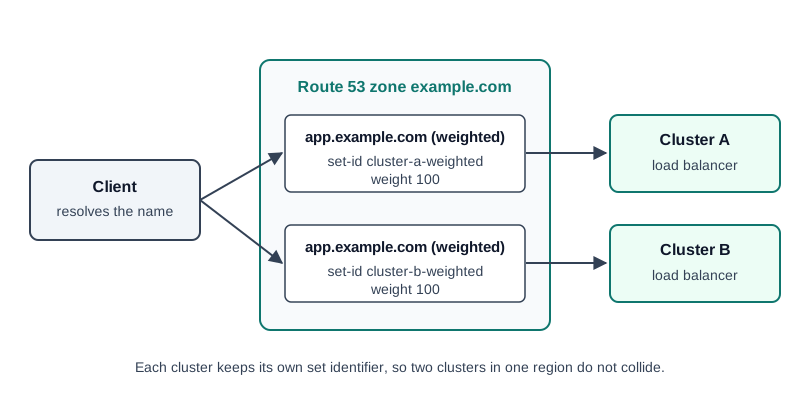 Figure 1: Two clusters in one region, one hostname, one weighted record per cluster
Choosing a routing policy
The rule of thumb is short. Latency means "nearest region wins." Weighted means "I set the split." Failover means "one side is a standby." The table compares them as they apply to multi-cluster names.
| Policy | Use when | Set identifier | What decides the answer | Trade-off |
|---|---|---|---|---|
| Latency | Clusters sit in distinct regions | The region | Lowest measured latency from the resolver | Two clusters in one region collide |
| Weighted | Clusters share a region, or you want a fixed split | One per cluster | Record weight divided by total weight | Does not know which region is closer |
| Failover | Exactly one primary and one standby | Primary or secondary role | Health of the primary | Only two sides |
| Simple | One target only | None | The single value | Cannot span clusters |
To run weighted records from external-dns yourself, put a set identifier and a weight on each Service. The following example is adapted from the external-dns AWS tutorial, where two Services share one hostname:
apiVersion: v1
kind: Service
metadata:
  name: app-cluster-a
  annotations:
    external-dns.kubernetes.io/hostname: app.example.com
    external-dns.kubernetes.io/set-identifier: app-cluster-a
    external-dns.kubernetes.io/aws-weight: "50"
spec:
  type: LoadBalancer
The set identifier must be unique per cluster. The second cluster's Service uses its own identifier, such as app-cluster-b, and its own weight. The tutorial notes that external-dns creates one weighted record set per Service, so the split follows the weights exactly as Route 53 defines them.
The ownership record that stops the fights
Every record external-dns writes gets a TXT companion. The tutorial's example for a Service in the default namespace produces a value like this:
"heritage=external-dns,external-dns/owner=external-dns,external-dns/resource=service/default/nginx"
Two parts matter. heritage=external-dns marks the record as managed by the controller. external-dns/owner= names the controller instance that owns it, which you set with --txt-owner-id. A controller changes only the records whose owner matches its own. If a record keeps reverting, check the owner on its TXT record before anything else.
A per-cluster controller configuration looks like this:
args:
  - --source=service
  - --source=ingress
  - --domain-filter=example.com
  - --provider=aws
  - --policy=upsert-only
  - --aws-zone-type=public
  - --registry=txt
  - --txt-owner-id=cluster-a
Give each cluster a distinct --txt-owner-id. Two controllers with the same owner ID will treat each other's records as their own. --policy=upsert-only prevents deletions. Full synchronization, including deletions, requires --policy=sync. Choose that on purpose, because a sync policy will remove a record the moment the controller decides it is stale.
Placeholder, then adopt
There is an ordering problem at deploy time. The load balancer does not exist until the workload is up, so there is no address to publish. Dependent automation, such as certificate issuance and health checks, still wants the name to resolve.
One pattern solves it. Seed a placeholder record when the deployment starts, using an address from the documentation range. RFC 5737 reserves 192.0.2.0/24 for documentation and examples, so 192.0.2.1 will never route to a real host. When the load balancer appears, the controller adopts the record and rewrites it to the live address. The deployer creates the name, and the controller makes it true.
Adoption depends on ownership. The placeholder has to carry the owner marker that the controller expects. A placeholder under the wrong owner looks foreign, so the controller leaves it alone, and the hold address stays. The failure is quiet. The deployment reports healthy, the name answers 192.0.2.1, and nothing throws an error.
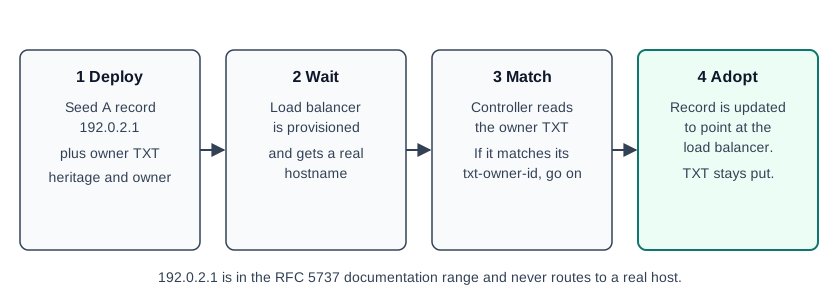 Figure 2: Placeholder-then-adopt in four steps, with one owner marker throughout
Figure 2 shows the four steps. You can check each one from a terminal:
dig +short app-cluster-a.example.com A
dig +short app-cluster-a.example.com TXT
Before adoption, the first command returns the placeholder. The output below is illustrative, not captured from a live zone:
192.0.2.1
"heritage=external-dns,external-dns/owner=cluster-a,external-dns/resource=service/default/app-cluster-a"
After adoption, the A query returns the addresses behind the load balancer, and the TXT record still names the same owner. If the A query still returns 192.0.2.1 after the load balancer is up, look at the owner on the TXT record first.
Cross-account is a permissions problem
A common multi-cluster layout puts clusters in different AWS accounts while the DNS zone lives in one of them. The controller can handle this, but only if its role may change records in the zone's account. The usual pattern is role assumption. The cluster's identity is allowed to assume a role in the zone's account, and that role carries route53:ChangeResourceRecordSets scoped to the hosted zone. The lookup calls, such as route53:ListHostedZonesByName, also need to be granted to that role.
The failure mode is silent. The controller runs, sees the Service, gets an access denied from Route 53, logs it, and moves on. The deployment looks healthy and its URL never resolves. When a per-cluster URL is dark but the pod is running, suspect IAM before DNS. The companion post on wildcard certificates with cert-manager covers the same role chain from the certificate side, including a lookup permission that is easy to miss.
Teardown is where records leak
Creation is easy. Deletion is where records rot. If the workload is deleted and the controller stops before it reconciles the removal, the record keeps pointing at a load balancer that no longer exists. In a multi-cluster name, several records contribute to the same hostname, and only the owning cluster can remove its own.
Two habits prevent most leaks. First, delete the workload and let the controller observe the removal before you remove the controller. Second, after a bulk teardown, check the zone instead of trusting that it drained. A stale alias can serve wrong answers, and a freed load balancer address can later be claimed by something else. Verify the zone afterwards with the same dig queries used above.
How SeaGit handles this
SeaGit runs this pattern for you. The facts below come from the product documentation and the platform code, as of October 2026.
- Per-cluster external-dns. Each cluster gets an external-dns add-on. The AWS variant serves Route 53 domains, and the PowerDNS variant serves SeaGit-managed
*.segt.iodomains. A cluster without the matching add-on deploys the app, but its URL never resolves. DNS and domains describes the three pieces: your domain, the ingress controller and external-dns. - The platform writes the shared deployment record. When one deployment spans clusters, the cluster-worker writes the shared hostname record itself. The repository code comments say the platform owns those records so that a second writer does not fight it. The per-cluster controller handles each cluster's own ingress record.
- The policy follows the cluster layout. When clusters sit in distinct regions, the record uses latency routing. When two or more clusters share a region, the record uses weighted routing with equal weight for each cluster. Failover is used when an environment has exactly two clusters and failover is selected. The environment's routing options are Simple, Latency and Failover. Routing policies are configured on the environment and need a paid plan, per Domains. The multi-region guide walks through two regions step by step, with one VPC per region.
- Placeholder handoff. On Route 53 domains, when a cluster's leaf record is not ready, the cluster-worker writes a placeholder at
192.0.2.1with the ownership TXT records that external-dns expects. The controller then adopts it when the load balancer is ready, so the deploy does not wait on the controller's timing.
Limits: the multi-region routing described here is a paid-plan feature. A SeaGit network is region-scoped, so each region needs its own VPC before its cluster can be created.
Frequently asked questions
How do I route one hostname to two Kubernetes clusters?
Give each cluster its own record with a unique set identifier. Use latency routing when the clusters sit in different regions. Use weighted routing when they share a region or when you want to set the split yourself. external-dns can write both from Service annotations.
Why does the second cluster's record fail in the same region?
Latency records use the region as their set identifier. A second cluster in that region reuses the identifier, and Route 53 rejects the change. With external-dns, switch that record to weighted routing with a per-cluster identifier. SeaGit makes this switch itself: when two clusters in an environment share a region, it writes weighted records instead of latency records.
Why does external-dns keep reverting my record?
Either another controller owns the record, or the TXT ownership record does not match this controller's --txt-owner-id. Read the TXT record first, then compare its owner value with the controller's arguments.
Can external-dns manage records in another AWS account?
Yes, if the controller's role may change records in the zone's account. Without that permission the controller logs an access denied, and the URL never resolves while the pod keeps running.
Sources
Checked October 2026.
- external-dns AWS tutorial: weighted annotations,
--registry=txt,--txt-owner-id, the TXT ownership record format and--policy=upsert-only. - Amazon Route 53: Weighted routing: weight calculation and the effect of a weight of 0.
- Amazon Route 53: Latency-based routing: region-based selection by measured latency.
- RFC 5737: IPv4 Address Blocks Reserved for Documentation: the
192.0.2.0/24range used for the placeholder address.